.jpg)














Nobody’s Talking About These Basic Computer Skills For Beginners







Summary
Basic computer skills for beginners include operating a computer, managing files and folders, browsing the internet safely, using email, and working with MS Word, Excel, and PowerPoint. These are the minimum digital skills most entry-level jobs in India expect today regardless of your degree, stream, or city.
Here’s an uncomfortable number: only about 1 in 4 Indians aged 15 and above is considered computer literate, and in rural India, that drops to roughly 1 in 5 (International Journal of Humanities and Educational Research, 2026). In cities, it’s closer to 2 in 5.
So if you’ve ever quietly Googled “how to attach a file in Gmail” or panicked when someone said “just export it to Excel,” you’re not behind. You’re just part of the majority nobody talks about.
And here’s the part that actually matters for your career: in 2026, that one gap isn’t your degree, your English, or your city. It’s basic computer knowledge. It’s quietly deciding who gets shortlisted and who gets ghosted.
Let’s fix that, starting now.
Table of Contents
- What Are Basic Computer Skills
- Why Does Basic Computer Knowledge Matter More Than Ever in 2026?
- What Basic Computer Skills Should a Beginner Learn First?
- How Long Does It Take to Learn Basic Computer Skills?
- Two Candidates, One Job: A Real-World Scenario
- Free vs Structured: What Actually Works for Beginners?
- Where a Course Like ICA Edu Skills’ Fits Into This
- But What If I’m Too Old / Too Slow / Not Tech-Savvy?
- The Bottom Line
- Frequently Asked Questions
What Are Basic Computer Skills
“Basic computer skills” sounds vague on purpose; job ads love that phrase without explaining it. Here’s what it actually means in practice:
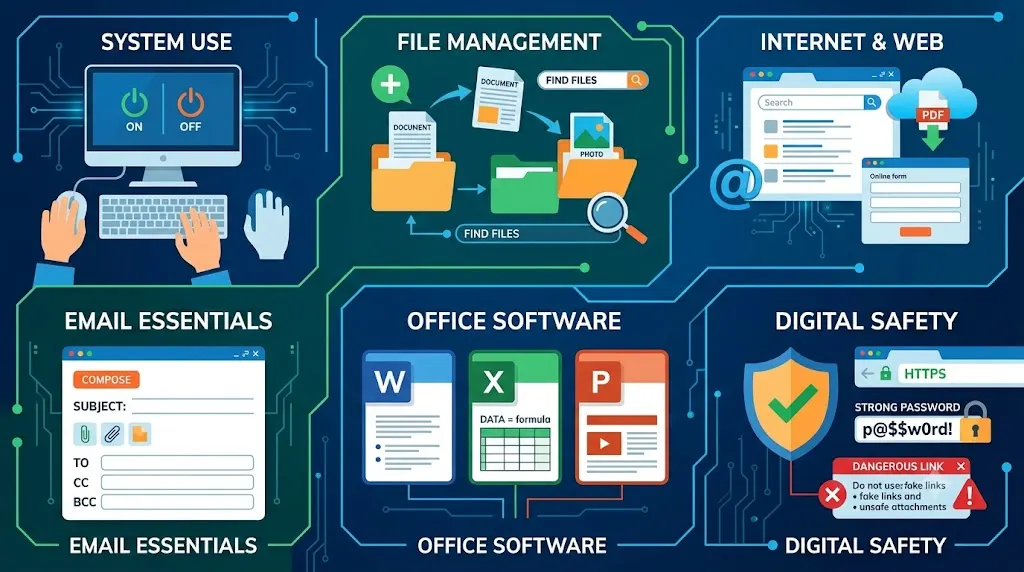
- Operating a computer: switching it on/off safely, using a mouse and keyboard, understanding icons, taskbars, and settings
- File management: creating folders, saving, renaming, and finding files without asking someone else to find them for you
- Internet basics: using a browser, searching effectively, filling online forms, downloading safely
- Email etiquette: writing a professional email, attaching files, using CC/BCC correctly
- MS Office fundamentals: Word for documents, Excel for numbers and basic formulas, PowerPoint for presentations
- Typing speed and accuracy: even 25–30 words per minute changes how fast you work
- Basic digital safety: spotting fake links, using strong passwords, not clicking random attachments
If that list feels intimidating, don’t worry; none of it requires a technical degree. It requires practice.
Why Does Basic Computer Knowledge Matter More Than Ever in 2026?
This isn’t a “nice to have” anymore. A few numbers make that clear:
- National employability in India climbed to 56.35% in 2026, up from 54.81% the previous year, and digital fluency is one of the biggest reasons why (India Skills Report 2026, ETS-CII-AICTE-AIU-Taggd).
- The IT sector alone is driving 35% of all fresher hiring this year, well ahead of every other industry.
- Over 90% of Indian employees now use generative AI tools at work in some form, and you can’t use AI tools well if you’re still unsure how to open a spreadsheet.
Here’s the pattern: even jobs that aren’t “computer jobs” retail, logistics, customer support, accounts, teaching now run on computers. Attendance is digital. Billing is digital. Reporting is digital. The computer isn’t a tool for one department anymore. It’s the desk itself.
What Basic Computer Skills Should a Beginner Learn First?
Don’t try to learn everything at once; that’s how most people quit in week one. Follow this order instead:
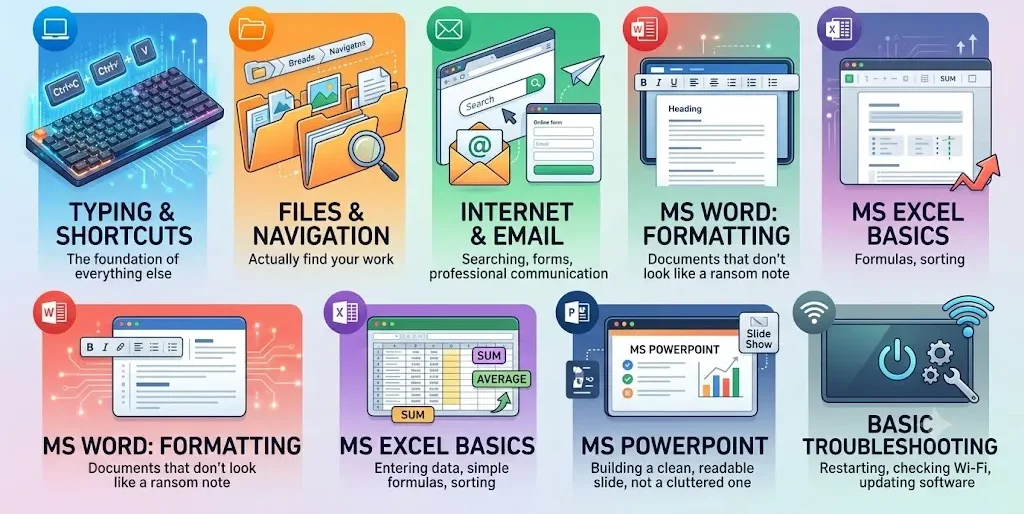
- Typing and keyboard shortcuts: the foundation everything else sits on
- Files, folders, and navigation so you can actually find your own work
- Internet and email: searching, forms, and professional communication
- MS Word: formatting a document that doesn’t look like a ransom note
- MS Excel basics: entering data, simple formulas (SUM, AVERAGE), sorting
- MS PowerPoint: building a clean, readable slide, not a cluttered one
- Basic troubleshooting: restarting, checking Wi-Fi, updating software
Once these seven feel comfortable, you’re no longer “not tech-savvy.” You’re computer literate officially, in the top bracket of that 24.7% figure we started with.
How Long Does It Take to Learn Basic Computer Skills?
Realistically:
- 4–8 weeks to get comfortable with typing, file handling, internet use, and MS Office basics, practising about an hour a day
- 2–3 months to feel genuinely confident, including simple Excel formulas and clean formatting
- Ongoing like driving, you improve every time you use it for real work, not just practice
There’s no finish line where you’re “done.” There’s a point where you stop feeling anxious opening a new file, and that point comes faster than most beginners expect.
Two Candidates, One Job: A Real-World Scenario
Picture this. A company is hiring for an office coordinator role. Two candidates apply:
- Candidate A has a B.Com degree, strong marks, and no formal computer training. In the interview, she’s asked to quickly format a table in Excel and share it by email. She hesitates, fumbles with the ribbon menu, and takes eight minutes.
- Candidate B has a diploma from a smaller college but completed a short beginner computer course. She opens Excel, formats the table, adds a basic formula, and emails it in under two minutes.
Same job. Same salary band. Very different outcome. This is happening in interview rooms across India right now, and it has almost nothing to do with intelligence; it’s purely about who practised the basics.
Free vs Structured: What Actually Works for Beginners?
Both paths can work, depending on how you learn best.
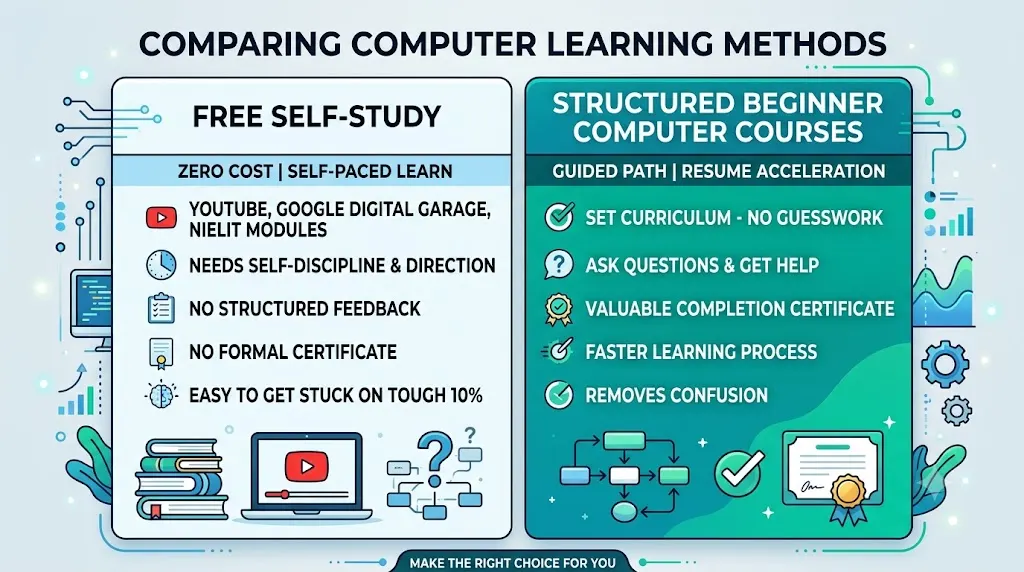
Free self-study (YouTube, Google Digital Garage, NIELIT modules)
- Zero cost, learn at your own pace
- Works well if you’re self-disciplined and already have some direction
- No structured feedback, no certificate, easy to get stuck on the 10% that actually trips beginners up
Structured beginner computer courses
- Set curriculum, so you don’t waste time guessing what to learn next
- Someone to ask when Excel throws an error you don’t understand
- A certificate that gives your resume something concrete to point to
- Usually faster, because the guesswork is removed
If you’ve tried the free route and keep restarting from scratch, that’s usually a sign you need structure, not more willpower.
Where a Course Like ICA Edu Skills’ Fits Into This
This is exactly the gap ICA Edu Skills’ foundational computer courses are built around: starting with MS Office and internet fundamentals for absolute beginners, and letting you progress into Advanced Excel, Tally, GST, or SAP once the basics are solid.
The sequencing is deliberate: you don’t get dropped into formulas and pivot tables before you can confidently save a file in the right folder. Each module builds on the last one, so by the time you’re job-hunting, “basic computer skills” on your resume is backed by something you can actually demonstrate in an interview- the same table-and-email test Candidate B walked through above.
If you’ve been putting off learning because you don’t know where to start, that’s the exact problem this kind of structured, beginner-first course is designed to solve.
But What If I’m Too Old / Too Slow / Not Tech-Savvy?
Every beginner carries one of these fears. Let’s address them directly:
- “I’m too old to learn this.” Computer literacy isn’t age-dependent; it’s practice-dependent. People in their 40s and 50s learn Excel every day; they just need patient, structured teaching instead of a 15-year-old’s YouTube tutorial pace.
- “I’m just not a tech person.” Nobody is born knowing where the Save button is. Everyone who looks “naturally good” with computers simply started earlier and got stuck less often.
- “I don’t have time.” You don’t need 4 hours a day. 30–45 focused minutes daily beats an occasional weekend binge.
- “I’ll forget everything.” You won’t, if you learn by doing real tasks, not just watching. Typing your own resume in Word teaches you more than ten tutorial videos.
None of these fears are unusual. All of them are solvable.
Your first step into Microsoft Office, the right way
Word, Excel, PowerPoint, and Outlook: expert trainers, NSDC certified and placement support.
The Bottom Line
Basic computer skills aren’t a small footnote on your resume anymore; they’re the entry ticket. The good news? Unlike a lot of career gaps, this one is entirely fixable in a matter of weeks, not years, and it doesn’t require starting your education over.
Start with typing and file handling this week. Add email and internet basics next. Move into Word, Excel, and PowerPoint after that. If you’d rather not figure out the order and pacing on your own, a structured beginner computer course can take that decision off your plate and get you interview-ready faster.
Few related topics for your knowledge
- How To Create A Database Design In Excel: Step By Step Guide
- Custom Number Formatting In Excel: Learn Amazing Tricks To Employ
- Excel Lookup And Reference Functions: A Step By Step Guide
- How to Use Python in Excel – Tutorial and Tips
- Master The Visual Basic Editor In Excel
- Flash Fill In Excel: What Is it & Step By Step Tutorial
Frequently Asked Questions
1. What are basic computer skills for beginners?
Basic computer skills for beginners include operating a computer, managing files and folders, browsing the internet safely, using email, and working with MS Word, Excel, and PowerPoint. These are the minimum digital skills most entry-level jobs in India expect today, regardless of your degree or field.
2. How can I learn basic computer skills at home for free?
Yes, start with free resources like YouTube tutorials, Google’s Digital Garage, or NIELIT’s free modules to learn typing, MS Office basics, and internet use. Free learning works for self-motivated beginners, but a structured beginner computer course helps if you need deadlines, feedback, and certification.
3. Is basic computer knowledge enough to get a job in India?
Basic computer knowledge alone can get you entry-level roles like data entry, back-office support, or office admin. For better-paying or specialised jobs, pair it with skills like Excel formulas, Tally, or SAP. Employers increasingly treat computer literacy as a baseline, not a bonus.
4. What is the best computer course for a complete beginner?
The best beginner computer course depends on your goal. For general office jobs, look for one covering MS Office, typing, and internet basics with practical assessments. For accounting or finance roles, choose a course that also includes Tally, GST, or Excel for business use.
5. How long does it take to become computer literate?
Most beginners can learn core basic computer skills typing, file handling, internet use, and MS Office fundamentals in 4 to 8 weeks with regular practice of about an hour a day. Becoming fully confident with advanced tools like Excel usually takes 2 to 3 months.

- Power BI Training Classes: Your Shortcut Into Data Jobs - October 31, 2026
- Which Tally Course is Best for Getting a Job? - October 29, 2026
- What’s the Difference Between GST Courses and Accounting Courses? - October 27, 2026