
.jpg)
















SAP-MM Module T-Codes: Lists Every SAP MM Learner Must Know







This guide isn’t just a list of commands; it’s your roadmap to mastering the SAP-MM Module T-Codes,
Table of Contents
- Why Mastering SAP MM Transaction Codes is Your Career Power Move
- 1. The Foundation: Material Master and Vendor Master SAP MM
- 2. The Procurement Cycle: From ME51N to ME21N
- 3. The Sourcing Strategy: Source List and Info Records
- 4. Inventory Management:
- 5. Logistics Invoice Verification (MIRO)
- 6. Comprehensive SAP MM T-Codes Reference Table
- 7. Troubleshooting the Top 5 SAP MM Errors
- 8. Career Roadmap: From T-Codes to Transformation
- Final Thoughts
- Frequently Asked Questions (FAQs)
Why Mastering SAP MM Transaction Codes is Your Career Power Move
Knowing your SAP MM T codes list signals to a hiring manager that you have practical training and aren’t just reciting a textbook.
Think of T-Codes as the DNA of the SAP MM Module. Every procurement cycle, from a simple Purchase Requisition to a complex Invoice Verification, is triggered by these codes.
1. The Foundation: Material Master and Vendor Master SAP MM
The Material Master (MM01, MM02, MM03)
The material master SAP mm is the most central data object in SAP. It contains all the info about a product: how it’s weighted, how it’s taxed, and how it’s stored.
- MM01 (Create): Used when a new product enters the company’s catalog.
- MM02 (Change): Used for updates, like changing a base unit of measure or updating a valuation class.
- MM03 (Display): The “read-only” mode. Use this to avoid accidental data corruption during routine checks.
The Vendor Master (XK01/BP, XK02, XK03)
A vendor master SAP MM record is where you store your supplier’s details. While S/4HANA has transitioned much of this to the “Business Partner” (BP) concept, the core logic remains: you can’t pay someone if the system doesn’t know who they are.
| T-Code | Function | Pro-Tip |
|---|---|---|
| MM01 | Create Material | Always check if a similar material exists to use as a “Reference” to save time. |
| MM02 | Change Material | Be careful with ‘Base Unit of Measure’ changes; they can break existing POs. |
| XK01/BP | Create Vendor | Ensure the ‘Reconciliation Account’ is correct |
2. The Procurement Cycle: From ME51N to ME21N
Step 1: Purchase Requisition (ME51N)
The ME51N is an internal document. It’s a “request” for the purchasing department to buy something.
Common Pitfall: Users often forget to check the “Source Determination” box. If you don’t check it, SAP won’t automatically look for a valid vendor.
Step 2: The Purchase Order (ME21N, ME22N, ME23N)
The Purchase Order SAP MM (ME21N) is the legally binding contract.
- ME21N (Create): The “N” stands for “Enjoy” (SAP’s way of saying it’s the updated, user-friendly version).
- ME22N (Change): Used if the price fluctuates or the delivery date shifts.
- ME23N (Display): Used by warehouse staff to see what’s arriving soon.
Insider Tip: If you’re dealing with a vendor who constantly ships in installments, master the “Delivery Schedule” tab in ME22N. It will save you hours of manual tracking.
3. The Sourcing Strategy: Source List and Info Records
How does SAP know which vendor gives you the best price? It uses the source list SAP MM and Purchase Info Records (PIR).
Source List (ME01)
The source list tells the system: “For Material A, we are allowed to buy from Vendor X or Vendor Y, but Vendor X is preferred.”
- ME01: Maintain Source List.
- ME03: Display Source List.
Purchase Info Record (ME11)
The PIR (ME11) links a specific material to a specific vendor with a specific price. It’s the “memory” of the system regarding pricing history and lead times.
4. Inventory Management:
Once the vendor delivers the goods, the warehouse takes over. This is the most “hands-on” part of the SAP MM transaction codes list.
MIGO:
- Goods Receipt (GR): Receiving the items.
- Goods Issue (GI): Taking items out of stock for production.
- Transfer Posting: Moving stock from one plant to another.
Stock Overview (MB52 and MMBE)
You cannot manage what you cannot see.
- MB52: Provides a list of warehouse stocks on hand (great for bulk reporting).
- MMBE: Provides a deep-dive look into a single material’s stock across all levels (Company Code -> Plant -> Storage Location).
Rule the Market with Professional SAP Training |
|||
| SAP Certification Courses | |||
| Explore All SAP Courses SAP FICO Course | SAP MM Course | SAP PP Course | SAP SD Course |
|||
5. Logistics Invoice Verification (MIRO)
The vendor sends a bill, and you have to make sure it matches what you ordered and what you received. This is known as the “Three-Way Match.”
- MIRO: Enter Incoming Invoice.
- MR8M: Cancel/Reverse Invoice (for when things go wrong).
- MIR4: Call up the invoice document to settle disputes.
If the price on the PO was $10 and the vendor bills $11, MIRO will trigger a “Price Variance” block.
Few SAP related topics for your knowledge
- Accounts Receivable Process In SAP:A Step-by-Step Process
- SAP FICO Enterprise Structure: A Comprehensive Guide
- Accounts Payable Process in SAP: Step by Step Guide
- Vendor Reconciliation in SAP: Definition, Steps, Scenario, Advantages
- SAP Order To Cash Process: Optimizing Financial Flows
- 25+ SAP MM Interview Questions & Answers: Cheat Sheet You Need Today
6. Comprehensive SAP MM T-Codes Reference Table
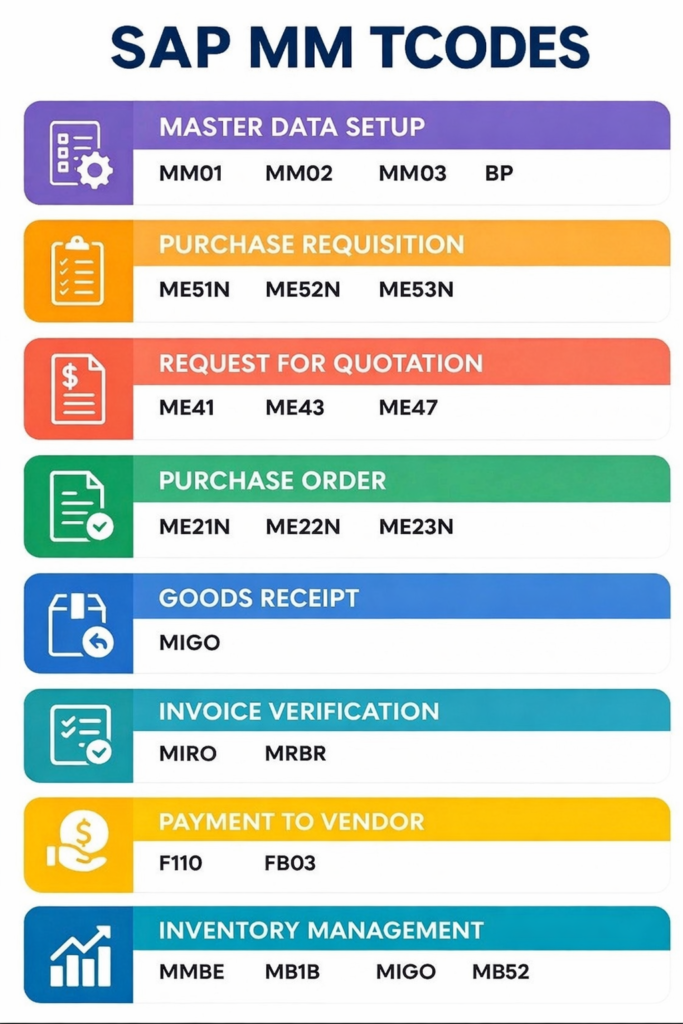
To make this actionable, here is your “Cheat Sheet.”
| Process Area | T-Code | Description | Real-World Context |
|---|---|---|---|
| Material Master | MM01 | Create Material | Launching a new SKU. |
| Material Master | MM03 | Display Material | Checking specs for a customer. |
| Purchasing | ME51N | Create Purchase Requisition | Internal department needs supplies. |
| Purchasing | ME21N | Create Purchase Order | Sending an official order to a vendor. |
| Purchasing | ME28 | Release Purchase Order | Managerial approval. |
| Inventory | MIGO | Goods Movement | Receiving boxes at the loading dock. |
| Inventory | MB52 | List of Warehouse Stock | Checking “How many do we have?” |
| Invoice | MIRO | Post Invoice | Telling Finance to pay the bill. |
| Reports | ME2L | POs by Vendor | Seeing how much business we do with one guy. |
7. Troubleshooting the Top 5 SAP MM Errors
Nothing kills your productivity like a sudden red error message at the bottom of your SAP GUI. However, most errors in the SAP MM Module are logical and easy to fix once you know what the system is actually asking for.
1. “Material [X] not maintained in Plant [Y]”
- Where it happens: ME21N (Purchase Order) or MIGO (Goods Receipt).
- The Problem: You’re trying to buy or move a material in a specific plant, but the record hasn’t been extended to that location.
- The Fix: Use MM01. Enter the material number and the new Plant. You don’t need to recreate the whole record, just add the “Purchasing” and “General Plant Data” views.
2. “Account requires an assignment to a CO object”
- Where it happens: ME21N or MIRO.
- The Problem: You are purchasing a “consumable” item. SAP needs a Cost Center to charge the expense.
- The Fix: In the PO, go to the “Account Assignment” tab and enter a Cost Center.
3. “PU Ordered quantity exceeded by [X] KG”
- Where it happens: MIGO.
- The Problem: Vendor sent more than what was ordered in the Purchase Order SAP MM.
- The Fix: Go to ME22N, find the “Delivery” tab, and increase the “Overdelivery Tolerance” percentage.
4. “Price too high (Tolerances [X] / [Y] exceeded)”
- Where it happens: MIRO.
- The Problem: Three-Way Match failure. Invoice price > PO price.
- The Fix: Update the PO in ME22N or request a Credit Memo from the vendor.
5. “Maintain Table T001W: Plant [X] does not exist”
- Where it happens: Most T-codes.
- The Problem: Typo or the plant hasn’t been defined in the enterprise structure.
- The Fix: Verify the code. If correct but failing, it requires configuration via SPRO.
8. Career Roadmap: From T-Codes to Transformation
Mastering SAP MM T codes isn’t just about memorization; it’s about understanding the business process they represent.
Final Thoughts
Your journey with SAP MM transaction codes is just beginning. As supply chains become more automated, there is a growing need for professionals who understand the data structures behind key SAP MM elements such as Purchase Orders, Source Lists, and MIGO movements.
Don’t just read this list. Open your SAP GUI, log into a sandbox, and execute these commands until they become muscle memory. That is how you turn a “skill” into a “career.”
Frequently Asked Questions (FAQs)
1. What is the most important T-Code in the SAP MM Module?
While it depends on your role, MIGO is generally the most critical as it handles all physical goods movements.
2. What is the difference between ME21 and ME21N?
ME21N is the modern, “Enjoy” version with a user-friendly, all-on-one-screen interface compared to the legacy ME21.
3. Can I delete a Material Master record using a T-Code?
No. You use MM06 to “Flag for Deletion,” which stops future use while maintaining historical audit trails.
4. How do I find a T-Code if I forget it?
Use T-Code SEARCH_SAP_MENU or check the status bar at the bottom right of your SAP screen.

Profession: SAP Master Trainer
Organization: ICA Edu Skills Pvt. Ltd
Industry Experience - Mr. Deepayan Das, CGMA, has more than 5 years of experience in the field of Management Accounting and Corporate Finance.
Linkedin Profile: https://www.linkedin.com/in/deepayan-das-cgma/
- SAP-MM Module T-Codes: Lists Every SAP MM Learner Must Know - March 27, 2026