













Course Overview

Our MIS course in Bangalore mirrors the exact reporting and analytics workflow that data teams follow across Bangalore's GCCs, BFSI firms, SaaS companies, e-commerce operations, and healthcare enterprises from raw data extraction right through to interactive dashboard publishing and automated executive reporting.

  • Power BI for Business Reporting

    Connect to multiple data sources, build interactive dashboards with slicers and tooltips, publish reports to Power BI Service, and configure automated data refresh. This is the first skill hiring managers at Whitefield GCCs and Manyata Tech Park firms test before anything else.

  • Advanced Excel for Data Analysis

    Work with VLOOKUP, INDEX-MATCH, and dynamic array functions; build pivot table pipelines; create MIS dashboards from scratch using Power Query. The non-negotiable baseline for every MIS, operations, and finance role across Electronic City and Bellandur.

  • G-Suite for Reporting

    Master Google Sheets for shared data workflows, Google Slides for management presentations, and Google Forms for structured data collection are essential for candidates targeting startups in Koramangala, HSR Layout, and Indiranagar that run entirely on Google Workspace.

  • Data Studio for Visual Insights

    Build live reports in Google Looker Studio connected to Google Sheets, GA4, and BigQuery. Design charts, apply filters, and share embeddable dashboards skills directly applicable to marketing, product, and operations analytics roles at Bangalore's digital-first companies.

  • VBA for Reporting Automation

    Write macros to automate repetitive Excel tasks, build custom user forms, and create event-driven procedures. This is the skill that separates shortlisted candidates from rejected ones at senior MIS roles in FMCG and BPO firms across Hebbal and Nagawara.

  • SQL for Data Querying

    Extract, filter, join, and aggregate data from relational databases using structured queries. Practise on realistic multi-table datasets replicating the data environments of Bangalore's banking, logistics, and healthcare firms, the skill most GCC interview panels test in round one.

Course Syllabus

Lecture 1 : Introduction to Power BI
Lecture 2 : Prepare Data in Power BI
Lecture 3 : Publish Power BI
Lecture 4 : Service Power BI
Lecture 5 : Desktop Tooltip Reports & Slicers in Power BI
Lecture 6 : Buttons & Bookmarks in Power BI

Module Benefit

Module Benefits:

Artificial Intelligence (Al) | Allows Analysis and Sharing of Big Data Personalized Dashboards and Interactive Reports | Access to Information in Real-time | Excel integration | Profuse Data Sources Support and Integration | Interactive UI/UX Features

Lecture 1 : Flash Fill & Data Validation
Lecture 2 : Advanced Conditional Formatting
Lecture 3 : ASAP Utilities
Lecture 4 : Lookup Functions
Lecture 5 : Match & Index
Lecture 6 : Dynamic Viookup
Lecture 7 : Data Table
Lecture 8 : Solver
Lecture 9 : Financial Functions
Lecture 10 : Sort & Filter
Lecture 11 : PowerPivot
Lecture 12 : Dashboard Creation
Lecture 13 : Power Map & Power Query
Lecture 14 : Macro
Lecture 15 : Array Functions
Lecture 16 : Google Drive
Lecture 17 : Mail Merge

Module Benefit

Module Benefits:

By understanding Advanced MS Excel Course, students will have the ability to use more sophisticated functions, which will allow them to analyse complex and large volume of data to present meaningful information helping in decision making.

Lecture 1 : Hello to Google Drive
Lecture 2 : Introduction to Google Sheet
Lecture 3 : Google Sheet Protection
Lecture 4 : Combine Data from Multiple Google Sheet
Lecture 5 : Google Slides
Lecture 6 : Google Form
Lecture 7 : Google Mail Merge
Lecture 8 : Google Cloud Printing

Module Benefit

Module Benefits:

Domain-based email | Improved team collaboration | Video conferencing | Enhanced data security and Privacy.

Lecture 1 : Google Data Studio
Lecture 2 : Creating Charts & Graphs
Lecture 3 : Filters & Controls
Lecture 4 : Custom Fields
Lecture 5 : Chart Styling
Lecture 6 : User Management: Sharing your Reports

Module Benefit

Module Benefits:

Access unlimited widget options | Pull data from multiple sources | Share Data Studio reports easily | Create easy-to-read reports for everyone | Get dynamic reporting | Build interactive experiences

Lecture 1 : Macro
Lecture 2 : Introduction to VBA
Lecture 3 : Working with Procedures & Functions
Lecture 4 : Customizing the VBA Environment
Lecture 5 : Understanding the Objects
Lecture 6 : Variables & Intrinsic Functions
Lecture 7 : Controlling Program Execution
Lecture 8 : Debugging Code & Handling Errors
Lecture 9 : VBA Programming Functions
Lecture 10 : Excel Form Control & ActiveX
Lecture 11 : Working with Forms & Controls

Module Benefit

Module Benefits:

Automates repetitive and routine tasks | Accessibility to other users | Reduces the formulas burden used in Excel reports | Reduces the turnaround time.

Lecture 1 : Introduction to SQL
Lecture 2 : Platforms to execute SQL codes
Lecture 3 : Creating a table
Lecture 4 : Data insertion
Lecture 5 : Auto increment and primary key
Lecture 6 : Alter table
Lecture 7 : Delete
Lecture 8 : Update
Lecture 9 : Top clause
Lecture 10 : String functions
Lecture 11 : Aggregate functions
Lecture 12 : Constraints
Lecture 13 : SQL join
Lecture 14 : Insert sub-query
Lecture 15 : Delete sub-query

Module Benefit

Module Benefits:

Commonality & Simplicity | Integrate easily with other programming languages | Ability to function at a high operating speed | No need of complex coding skills for data extraction.

Your Next Data Job Starts Here

Bangalore's IT firms, GCCs and startups are hiring; make sure your Power BI and SQL skills get you shortlisted.

Book Your Free Demo

Demand for MIS Course in Bangalore

  • India's Analytics Hub

    Bangalore has 875 GCCs, the most in any Indian city, running dedicated MIS and reporting teams tracking KPIs daily with Power BI and data analysts.

  • Analytics Jobs Surging

    India's analytics market grew 35% in 2025, crossing 2,00,000+ roles. Bangalore alone lists 1,300+ MIS vacancies, densest in Whitefield, Electronic City, and ORR.

  • GCC & Startup Growth

    Flipkart, Razorpay, and 13,000+ Bangalore startups urgently need analysts who turn raw ERP and CRM exports into decision-ready dashboards.

  • Hiring Across Bengaluru

    Infosys, TCS, Capgemini, EXL, Deloitte, Amazon, and L&T are filling MIS roles across Whitefield, Electronic City, Manyata Tech Park, and ORR.

Career Opportunities

Roles You Can Land After Completing an MIS Course in Bangalore

  • MIS Executive

    Report from ERP systems, build Excel dashboards, and track KPIs for IT, BFSI, and logistics firms in Whitefield, ORR, and Hebbal.

    ₹2.5 – 4.0 LPA

  • Power BI Developer

    Build interactive dashboards and publish scheduled reports for GCCs at Manyata Tech Park, Bagmane, and Embassy TechVillage.

    ₹4.5 – 9.0 LPA

  • Data Analyst

    Query data with SQL, clean datasets in Excel, and deliver insights to e-commerce, SaaS, and fintech firms in Koramangala and HSR Layout.

    ₹3.5 – 6.5 LPA

  • Business Analyst

    Convert business requirements into data models and reporting frameworks for enterprise firms in Electronic City and Bellandur.

    ₹4.0 – 7.5 LPA

  • Operations Analyst

    Analyse supply chain and inventory data using Excel and SQL for FMCG and manufacturing firms across Peenya, Tumkur Road, and Bommasandra.

    ₹3.0 – 5.5 LPA

  • MIS Manager

    Lead analytics teams, manage reporting infrastructure, and deliver C-suite dashboards for pharma and BFSI firms in Peenya and Yeshwanthpur.

    ₹6.0 – 11.0 LPA

MIS Certification

Complete the programme and assessment to earn an ICA Edu Skills certification endorsed by the National Skill Development Corporation (NSDC), a Government of India initiative. Hiring teams at Bangalore's GCCs, IT firms, BFSI companies, and startups use this credential to shortlist candidates at the initial screening stage.

MIS Certification

Salary Insights

  • MIS freshers with Power BI and SQL earn ₹2.5–4.0 LPA in Bangalore, well above uncertified candidates at ₹1.5–2.2 LPA.

  • MIS Analysts with Excel and Power BI portfolios earn ₹3.8–6.25 LPA, with Glassdoor's Bangalore average at ₹4.95 LPA.

  • Professionals with 2–4 years earn ₹5.0–9.0 LPA, with GCC roles in Whitefield and Manyata Tech Park hitting the upper band.

  • With 5+ years, MIS Managers earn ₹8.0–11.0 LPA at ORR and Electronic City firms requiring SQL, VBA, and executive reporting.

Sources: Glassdoor Bangalore (September 2025); Foundit.in Bangalore MIS listings (2025–26); Indeed India Bangalore (2025–26); LinkedIn Jobs Bengaluru (2025–26)

Min salary Max salary
₹125k ₹100k ₹75k ₹50k ₹25k ₹0
Fresher
(0–1 yr)
Junior
(1–3 yrs)
Mid-level
(3–7 yrs)
Senior
(7+ yrs)
Monthly salary in ₹ · Bangalore market

Our MIS Training Institutes in Bangalore

ICA Salt Lake
Bangalore-Rajaji Nagar
Karnataka, Bengaluru
ICA Salt Lake
Nelamangala
Karnataka, Bengaluru
ICA Salt Lake
Bangalore - Yelahanka
Karnataka, Bengaluru
ICA Salt Lake
Bangalore-Jayanagar
Karnataka, Bengaluru
ICA Salt Lake
Hubli
Karnataka, Bengaluru

Events and Activities

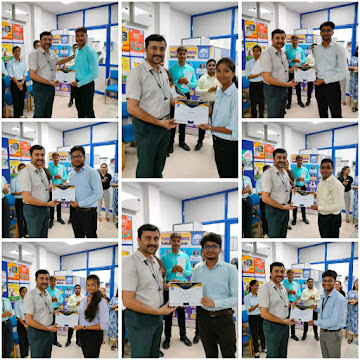
  • certificate distribution
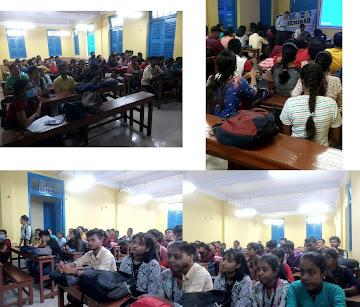
  • classroom
  • mock interview
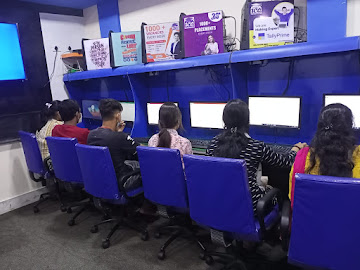
  • practical lab room
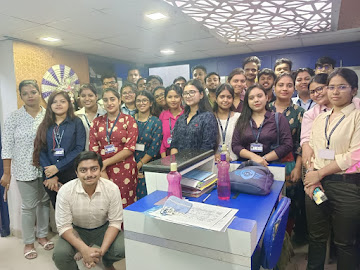
  • students

Our Alumni  Worked At

What Our Students' Says

Sufal Ghosh
Sufal Ghosh
...

This course gave a solid foundation in MIS and analytics. Some topics were challenging at first, but the step-by-step guidance helped. More real-life case studies would be nice, but overall, it’s a great start for beginners in data analysis.

Gabber Singh
Gabber Singh
...

ICA’s MIS course gave me practical skills in Excel, dashboards, and reporting that are directly useful in the workplace. The training was hands-on and easy to follow. Thanks to ICA’s placement support, I was able to secure a job shortly after completing the course.

Ratnakar
Ratnakar
...

ICA’s MIS Analysis course provided me with strong practical knowledge in data management and reporting. The hands-on training and real-time exercises enhanced my analytical skills. Ideal for a career in management

FAQs

Frequently Asked Questions

  • Course in Bangalore

The course is built around Power BI for dashboard development and Looker Studio for web-connected reporting. Power BI's data modelling and DAX logic transfer naturally to Tableau, and most Bangalore hiring managers accept strong Power BI proficiency as equivalent during fresher screening.

The SQL module covers table creation, joins, sub-queries, aggregate functions, and string manipulation at the level of GCC panels at Whitefield and Embassy TechVillage test in first-round assessments. You practise on realistic multi-table datasets drawn from banking and logistics scenarios.

Yes. The VBA module teaches macro recording, procedure writing, loop logic, and form-based automation, precisely what startups in Koramangala and HSR Layout expect you to demonstrate in live assessments. You will be able to automate any repetitive Excel reporting task independently.

Yes. The programme starts from Excel fundamentals and builds upward through SQL and Power BI step by step. No prior coding background is needed. Thousands of commerce graduates have transitioned directly into MIS and analytics roles through this pathway. Trainers adapt pace based on class progress.

Yes. The Power BI and Looker Studio modules use financial KPI layouts, month-on-month growth, portfolio breakdowns, and P&L summaries matching templates used by BFSI firms on MG Road, UB City, and the ORR. You build executive-level financial dashboards from scratch during the course.

The curriculum directly targets the tool stack these companies use: SQL for data querying, Power BI or Looker Studio for visualisation, and Advanced Excel for operational reporting. Assignments are modelled on e-commerce and fintech use cases, the two sectors where Bangalore unicorns hire most aggressively.

Enquire Now

Share this page

Share this page’s details with your family and friends.